
Modularization Strategies and the Maven Dependency-Graph Plugin
Bonjour à tous, and hi everyone! 👋
Today I want to talk about something that sounds dry but turns out to be surprisingly interesting once you're in the thick of it: how to modularize an existing Java codebase, and how a small Maven plugin can make that job a lot less painful.
A lot of what follows draws on Nicolai Parlog's excellent book(The Java Module System - specifically chapter 9), where he lays out the different modularization strategies. I'll keep it short and practical for those of you who don't feel like reading the whole book just yet.
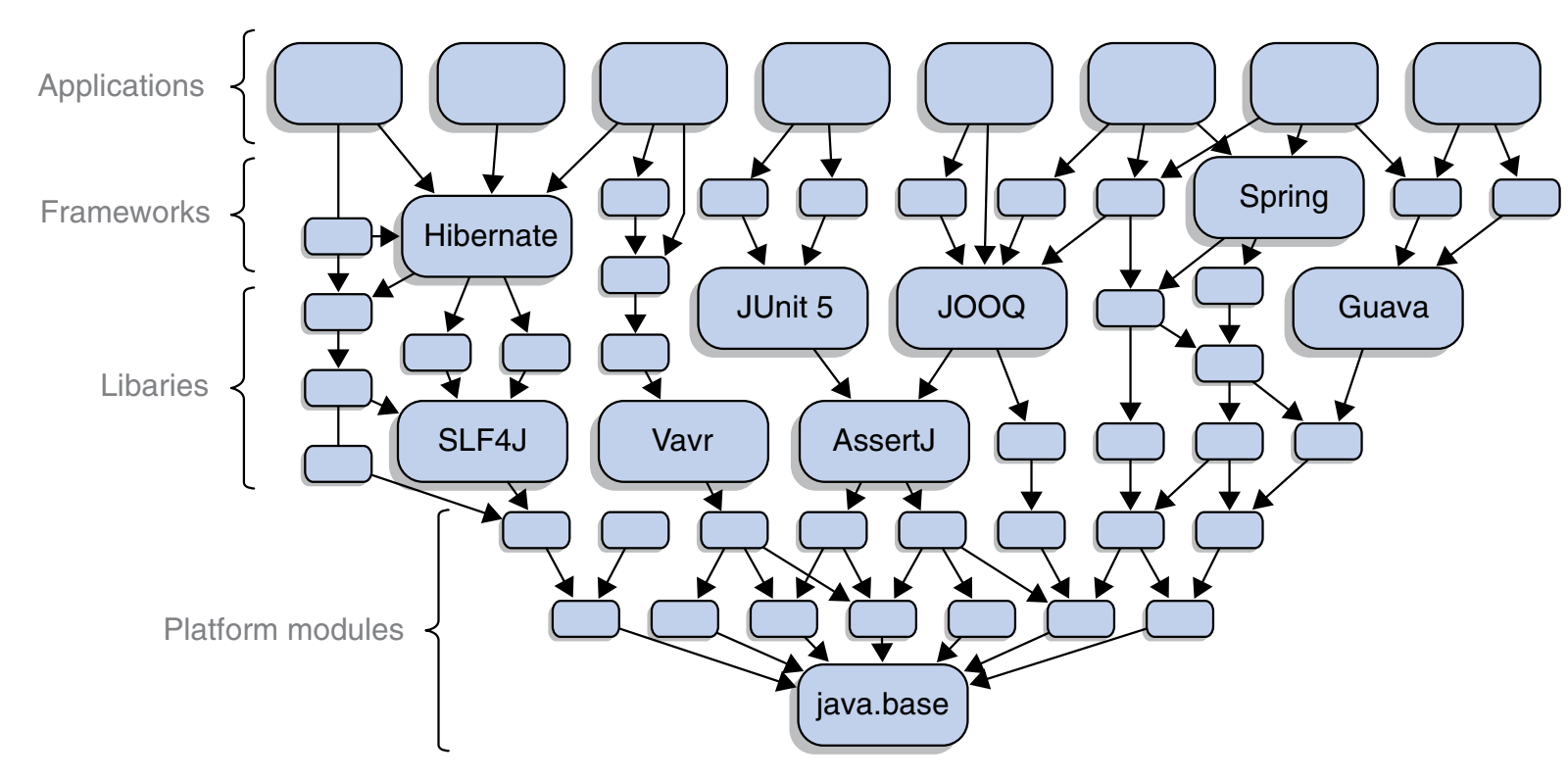
Parlog frames the whole problem nicely. He asks: ⁉️
"What are the best strategies to incrementally modularize a code base"⁉️
To answer that, he suggests picturing the entire Java ecosystem as one huge, layered graph of artifacts. Your project sits somewhere inside that graph, with dependencies below it and (sometimes) consumers above it. Where you sit, and what your dependencies look like, decides which strategy makes sense for you.
📝 Know your dependencies first:
Before you pick a strategy, you have to actually understand what you depend on both directly and indirectly. As Parlog puts it, you need to know quite a bit about your dependencies to modularize a project at all.
That's exactly the problem the Maven dependency graph plugin solves later in this post: it gives you a clear picture of your project's dependency structure so you can decide where to start. Once you know your dependencies, the decision tree below tells you which path to take.
📝 Let's walk through the three strategies
1️⃣ Bottom-up modularization:
This is the happy path. If your code only depends on explicit modules directly and indirectly, you can go straight ahead. It doesn't matter whether those are platform modules or application modules.
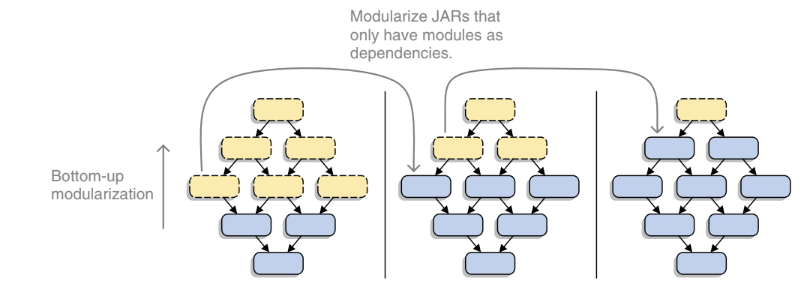
Create module declarations that require all your direct dependencies. Place the JARs with your non-JDK dependencies on the module path. And that's it, your project is fully modularized. 🎉
If you maintain a library or framework and your users put your JARs on the module path, those JARs become explicit modules, and your users immediately start benefiting from the module system. There's a nice, less obvious bonus too. Because all JARs on the class path end up in the unnamed module, nobody is forced to treat your JAR as a module. If someone wants to stay on the class path a while longer, your project keeps working exactly as if the module descriptor weren't there. Nothing breaks. If you'd like to modularize your library but your dependencies aren't modules yet, that's the inside-out case below.
2️⃣ Top-down modularization
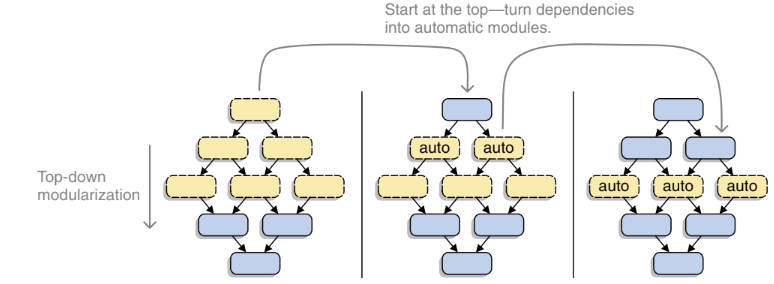
If you're an application developer and you want to modularize soon, it's unlikely that every one of your dependencies already ships as a modular JAR. If they do, lucky you take the bottom-up approach above. Otherwise, you'll need automatic modules and a mix of module path and class path. Here's the process:
▶️ Create module declarations that require all your direct dependencies.
▶️ Place all modular JARs, both the ones you build and your dependencies, on the module path.
▶️ Place all plain JARs that are directly required by modular JARs on the module path, where they're turned into automatic modules.
▶️ Decide what to do with the remaining plain JARs.
The easiest first attempt is often to throw all remaining JARs onto the module path in your build tool or IDE and just try it. It's not always the best approach, but it might work for you, and if it does, go for it. If you run into package splits or trouble accessing JDK-internal APIs, try moving those problematic JARs onto the class path instead. Because only automatic modules need them, and automatic modules can read the unnamed module, this works fine. A small note on automatic module names: if a name is derived from the filename, you may have to update some requires directives once the dependency gets a proper explicit module name. But since you control all your own module declarations, that's not a big deal.
3️⃣ Inside-out modularization:
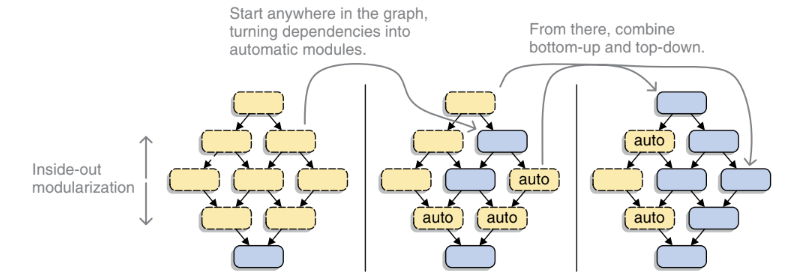
Most libraries and frameworks live neither at the very bottom nor at the very top of the stack. So what do they do? They modularize inside-out.
This strategy mixes the other two. It has a bit of bottom-up in it, because releasing modular JARs doesn't force your users to adopt them as modules. Otherwise, it works much like top-down with one important difference: you're planning to publish the modular JARs you build. That publishing step changes the stakes. You should only ever publish a module that depends on automatic modules if those plain JARs define an Automatic-Module-Name entry in their manifest. Otherwise, the risk is too high: if the automatic module's name later changes, you'll cause real problems for everyone downstream. This might mean you can't responsibly modularize your project yet. If you're in that situation, resist the temptation to publish anyway, you'll likely hand your users some very painful, hard-to-diagnose problems.
‼️So which strategy fits your project?
To choose well, you really need to understand your project's dependency structure. Sometimes a project is simply too big to take the top-down route comfortably.
A concrete example: the project I work on is Ptidej (git link). It's large enough that I obviously can't just start modularizing from the most dependency-heavy part, especially since I'm not yet deeply familiar with every corner of it. This is exactly where a dependency graph earns its keep: it lets me find the parts of the project with the fewest dependencies, which is the smart place to start.
🔄 Back to the plugin: generating a dependency graph with Maven
So let's get practical. Here's the plugin I use to find the dependencies of a Java project. The basic command:
☑️ mvn org.kuali.maven.plugins:graph-maven-plugin:dependencies
You'll find the generated graph at:
☑️ .../target/graph/dependency.png
If you'd rather tweak the graph yourself, keep the .dot file:
☑️ mvn org.kuali.maven.plugins:graph-maven-plugin:dependencies -Dgraph.keepDotFile=true
Then render it to PNG or SVG with Graphviz's dot:
☑️ dot -Tpng target/dependencies.dot -o target/dependencies.png
☑️ dot -Tsvg target/dependencies.dot -o target/dependencies.svg
And then you can open the graph. And based on this graph, start modularising your Java project. Here's the Ptidej graph which I generated.
The Ptidej dependency graph
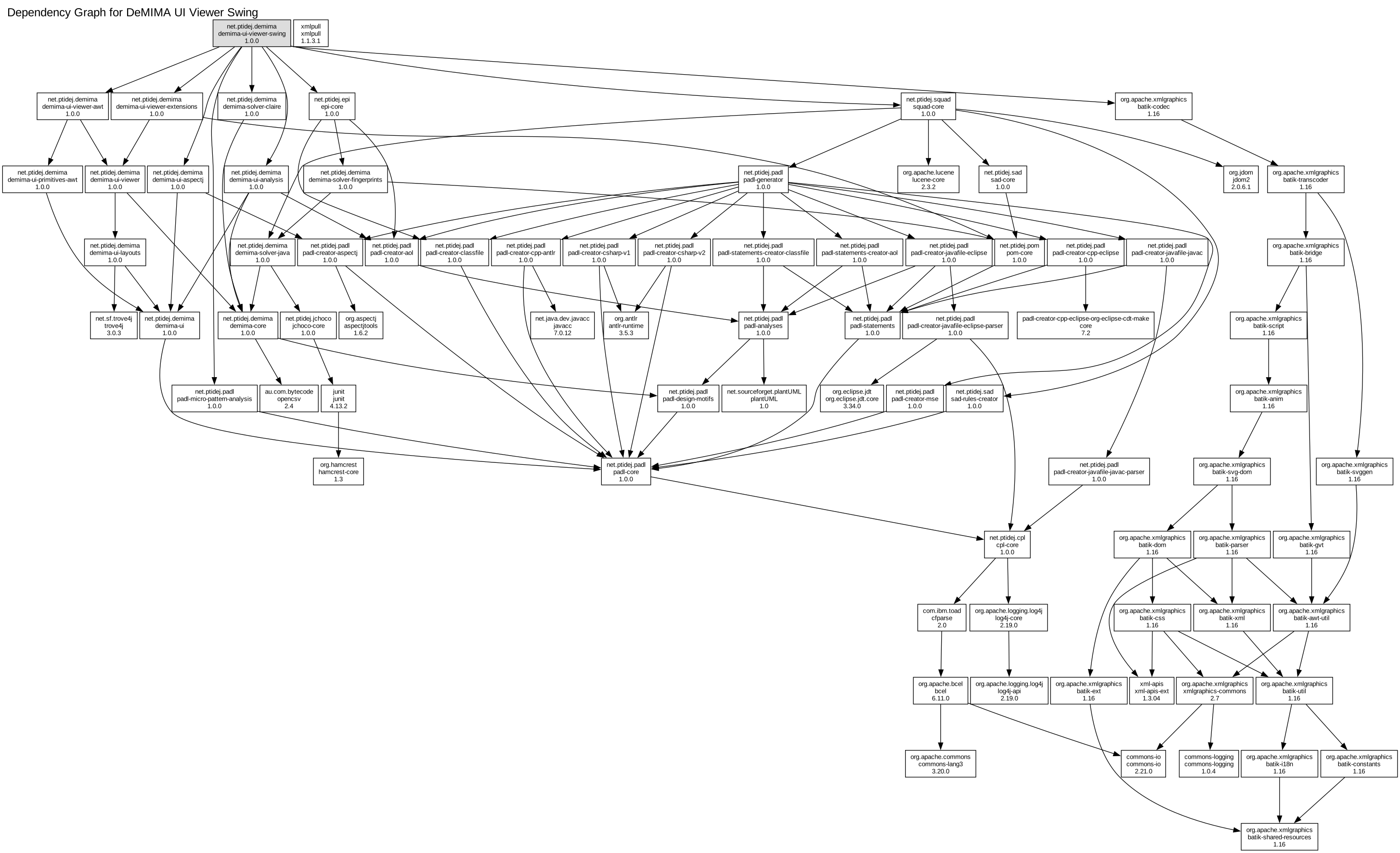
So you can see how huge it is ‼️‼️‼️
Just imagine trying to start modularizing the project without understanding the dependencies 🫠 (it is possible, but it will be a mess, trust me)
Voilà, c'est fini.
À la prochaine ! 👋
