
When working on a software project, we usually focus on what the code looks like today. Git allows us to go back and inspect previous versions, but understanding how an entire project evolved can still be difficult. We often have to jump between commits, compare files, and piece together the history ourselves.
This is what inspired me to start working on GitLapse, a web application that turns Git history into an interactive timelapse.
The idea is simple: instead of only reading a list of commits, what if we could actually watch a repository evolve?
GitLapse lets users move through commits, explore how files and folders change, and see development activity through different metrics. The project is still in development, but the main repository exploration features are now working.
Getting Started with GitLapse
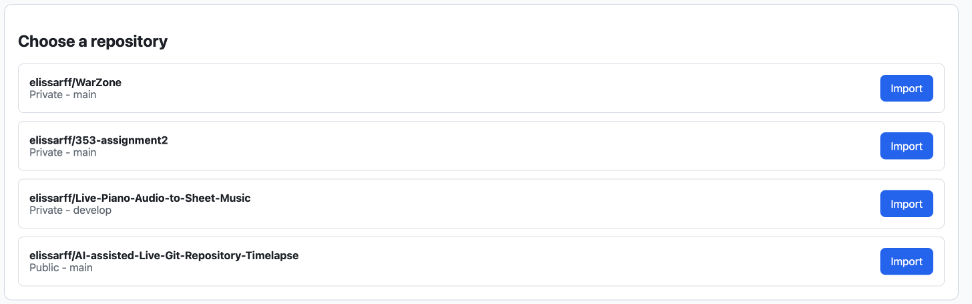
I wanted the application to work with real GitHub repositories, including private ones, without asking users to provide personal access tokens.
To do this, I integrated a GitHub App.
The user installs the app through GitHub and chooses which repositories to authorize. After installation, GitHub redirects the user back to GitLapse with an installation ID.
The backend verifies the installation with GitHub and saves its information in PostgreSQL. When GitLapse needs to access a private repository, it generates a short-lived installation token.
This allows users to connect their GitHub repositories and select which project they want to explore.
Watching the Repository History
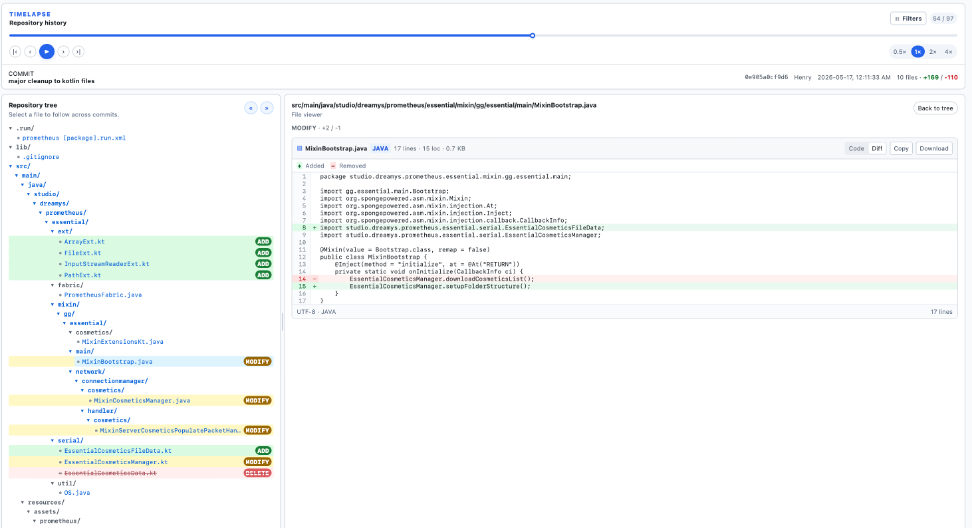
The main feature of GitLapse is the interactive timelapse.
After opening a repository, GitLapse retrieves its Git history and displays the commits on a timeline. Users can move backward and forward through commits, press Play to watch the repository evolve automatically, pause at any point, or change the playback speed.
I also added a branch selector. This allows users to explore the history of different branches without being limited to the default branch.
To make it easier to find specific changes, the timeline includes filters for contributors, dates, and commit messages. These filters also work with playback, so users can watch only the commits they are interested in.

Exploring Files as They Change
Watching commits is useful, but I also wanted users to see what was happening inside the repository.
For each selected commit, GitLapse reconstructs the repository's file tree. Users can expand folders, open files, and inspect their contents at that point in history.
The application also displays file differences, including added, modified, deleted, and renamed files.
The Challenge of Following a File Through History
One of the challenges was keeping file navigation consistent while the user moves between commits.
A Git commit represents a snapshot of the repository. This means that a file path is not guaranteed to exist in every snapshot. A file might be added in one commit, modified in another, renamed later, or deleted entirely.
For example, imagine the following history:
Commit A          Commit B          Commit C          Commit D
    |                 |                 |                 |
  App.java        App.java         Main.java         Main.java
  (added)         (modified)       (renamed)         (modified)
If the user selects App.java at Commit B and moves to Commit C, simply requesting App.java again would not work because the file is now called Main.java.
To handle this, GitLapse uses the changed-file information extracted by JGit. Each change contains a status and the relevant file paths. For renamed files, Git can provide both the previous and new path.
Conceptually, the navigation follows this logic:
When the selected commit changes:

1. Load the file tree for the new commit.
2. Check whether the selected file still exists.
3. Inspect the commit's changed-file information.
4. If the file was renamed, use its new path.
5. If the file was deleted, show its deletion.
6. Otherwise, load the file content at the new commit.
The backend retrieves file content using the selected commit SHA and file path. This is important because the same path can contain completely different code at different points in history.
For modified files, the diff view compares the versions before and after the change. For added or deleted files, one side of the comparison may be empty.
This approach lets the file explorer follow the repository's evolution rather than always displaying the latest version of the code.
Looking Beyond Individual Commits
I also wanted GitLapse to show patterns that are difficult to notice by looking at individual commits.
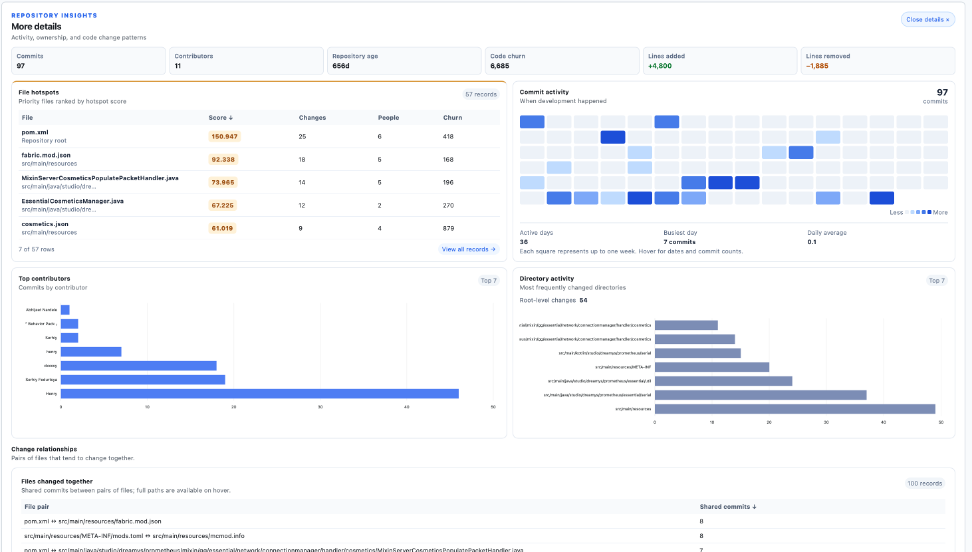
For this, I added a repository metrics dashboard.
It includes information such as the number of commits, contributors, repository age, lines added and removed, and code churn.
The application also calculates more detailed metrics, including contributor activity, frequently changed files, directory activity, and files that tend to change together.
Also, in addition to these metrics, the hotspot score metric combines how often a file changes with the amount of code added and removed:
Hotspot score = File change count × ln(1 + Code churn)
A file with a high score has experienced both frequent modifications and substantial code changes. This does not necessarily mean there is a problem, but it can help identify parts of a project worth investigating.
How GitLapse Retrieves/Syncs Git History
GitLapse uses React and TypeScript for the frontend, Java Spring Boot for the backend, and JGit to work with Git repositories.
When a repository is opened, the backend prepares a local Git copy. JGit reads the commit history, including authors, timestamps, messages, file changes, and diffs.
The backend then exposes this information through REST endpoints that the frontend uses to build the timelapse and metrics dashboard.
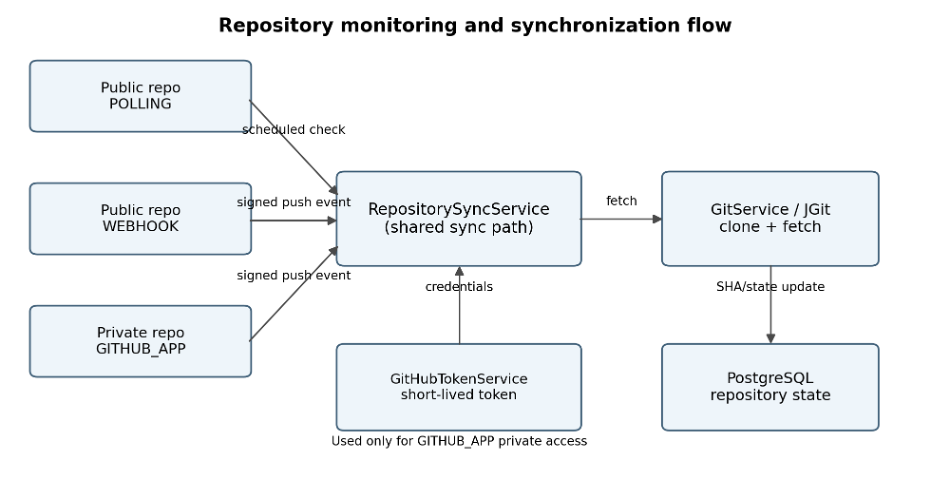
I also implemented a repository monitoring system with three possible ways to detect updates: polling, GitHub webhooks, and GitHub App events.
All three use the same synchronization process. The backend fetches the latest Git data, compares it with the last processed commit, and updates the stored synchronization state when new commits are found.
The goal is to avoid analyzing the entire repository again every time something changes.
What's Next?
The main Git history exploration features are in place, but there is still work to do.
My next priorities are improving performance for repositories with large histories, fixing some file-view transitions, and deployment.
The second part of the project will focus on AI-assisted repository analysis.
I plan to use an LLM to explain commits in simpler language, classify changes, and identify affected components. Later, I also want to support semantic searches, such as asking how a particular feature or component evolved throughout the repository's history.
For now, GitLapse is already helping me explore Git history in a much more visual way. I'm looking forward to continuing its development and seeing how the AI features can make software evolution easier to understand.
