
Introduction
In my previous blog posts, I explored the role of IoT middleware across multiple smart-city applications, emphasising its contributions to enhanced security, better overall well-being for residents, and improved energy management. In this post, I describe how an HVAC system can be modelled using EnergyPlus to optimise energy use and improve overall building performance.
EnergyPlus
EnergyPlus™ [1] is a comprehensive building energy simulation tool used by engineers, architects, and researchers to model energy consumption (for heating, cooling, ventilation, lighting, and loads) and water usage in buildings.
Key features include:
- Integrated simulation of thermal zones and HVAC systems, allowing for realistic modelling of unconditioned or under-conditioned spaces without assuming loads are always met.
- Heat balance-based calculations for radiant and convective effects, including surface temperatures, thermal comfort, and condensation.
- Flexible sub-hourly time steps for zone-environment interactions, with automatic adjustments for zone-HVAC dynamics to balance speed and precision
- Combined heat and mass transfer modelling that accounts for inter-zone air movement.
- Component-based HVAC systems supporting standard and custom configurations.
- Extensive built-in controls for HVAC and lighting, plus extensible scripting for custom strategies.
- Functional Mockup Interface for co-simulation with other tools.
- Customizable reports with various time resolutions (annual to sub-hourly) and energy source multipliers.
HVAC System
HVAC (Heating, Ventilation, and Air Conditioning) [2] refers to the technologies used to control temperature, humidity, and air quality in buildings, aiming to ensure thermal comfort for occupants and maintain healthy indoor environments. It's a branch of mechanical engineering that relies on thermodynamics, fluid mechanics, and heat transfer. HVAC systems are widely used in homes, buildings, vehicles, and marine environments. Ventilation, a key component, involves replacing or circulating air to maintain air quality by managing temperature, moisture, odours, and pollutants.
EnergyPlus requirements for running and HVAC model
- To run an HVAC model, EnergyPlus requires an input file that contains detailed information about the building. This includes the number of floors, rooms and open-space layouts, as well as details about building components such as wall height, thickness, materials, and other relevant parameters.
- EnergyPlus also requires a weather file that provides historical weather data for the city or location where the building is situated. Weather files can be downloaded from here: Weather Files
Running an HVAC model in EnergyPlus
Running an HVAC model in EnergyPlus involves a series of structured steps that guide the user from defining the building configuration to analysing the simulation results. The process integrates building geometry, material properties, HVAC system specifications, and local weather conditions to accurately predict energy performance.
-
Preparing Input Files:
- Building Input File (IDF):
This file contains detailed information about the building model. It includes data such as the number of floors, spatial layouts (including rooms and open areas), surface constructions (such as walls, roofs, and windows), and materials used. Additionally, the IDF defines internal loads (e.g., occupants, lighting, and equipment), HVAC system configurations, schedules, and control strategies.
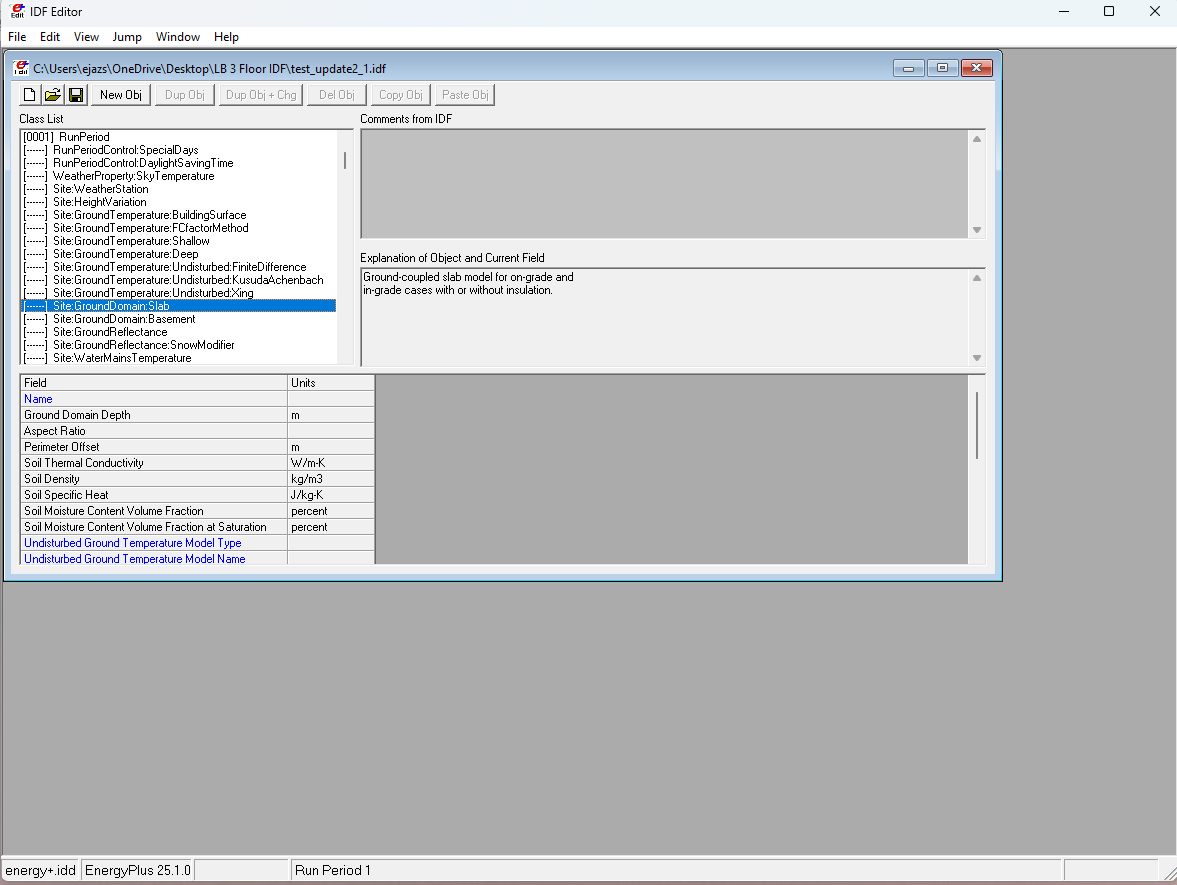
Users can create or modify this file directly using a text editor or through graphical interfaces such as the IDF Editor or OpenStudio. - Weather File (EPW):
EnergyPlus also requires a weather file that provides historical or typical meteorological data for the building’s location. The file contains hourly data, including temperature, humidity, solar radiation, and wind speed, which enables EnergyPlus to model the building's interaction with its environment throughout the year.
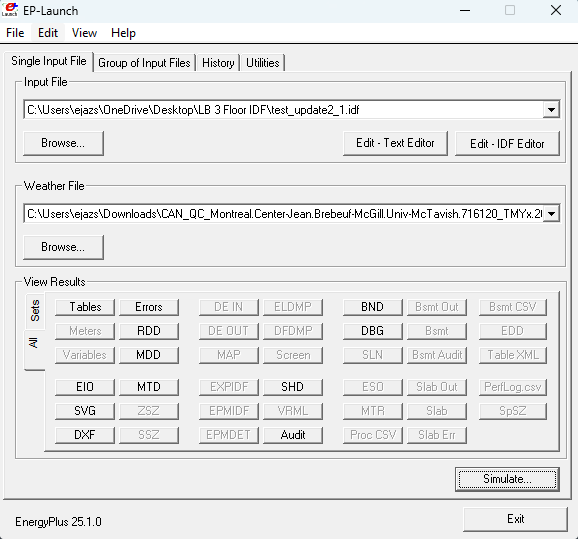
Before a simulation can begin, EnergyPlus requires two key input files:
-
Launching and Running the Simulation:
Once the input files are prepared, the user launches EnergyPlus and specifies the required files for the simulation. The software then processes the IDF and EPW files, checking for consistency and potential errors in model definitions.
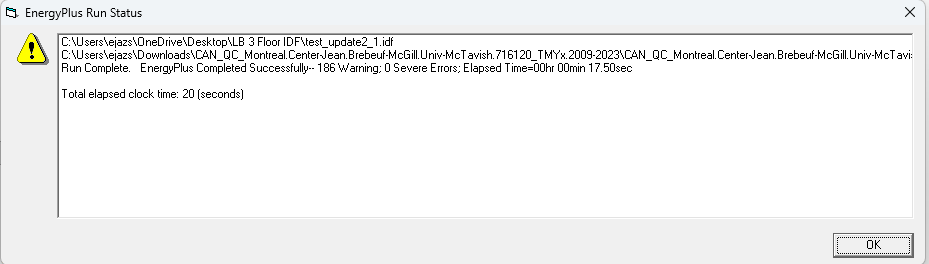
The simulation run produces a status report indicating whether the process completed successfully or encountered issues. If errors or warnings occur, EnergyPlus provides diagnostic messages in the .err file, helping users identify and correct issues in the input data or model configuration.
-
Reviewing Simulation Results:
- .eso (EnergyPlus Simulation Output): Contains time-series data for variables such as temperature, energy consumption, and equipment performance.
- .mtr (Meter Output): Summarises energy and water use by end-use category.
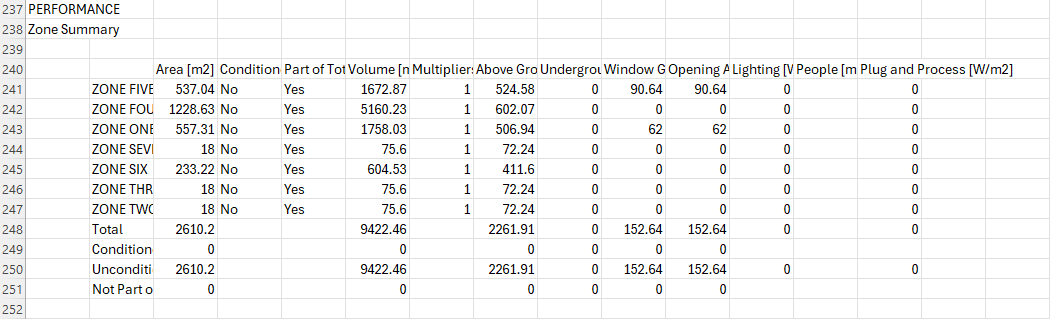
- .csv (Comma-Separated Values File): Provides formatted numerical results suitable for analysis in external tools such as Excel, MATLAB, or Python.
- .err (Error File): Logs errors, warnings, and severe messages encountered during the simulation. The output data allow users to analyse system behaviour, energy demand patterns, HVAC performance, and the impact of design decisions.
Upon successful execution, EnergyPlus generates a series of output files that summarise the simulation results. These include:
-
Modifying and Updating the Model:
- The IDF Editor, a graphical tool provided with EnergyPlus that enables users to edit and update model parameters such as geometry, materials, schedules, and HVAC configurations.
- External interfaces like OpenStudio or DesignBuilder, which provide more user-friendly, 3D-based editing environments and integrate directly with EnergyPlus. After modifications are made, the user can re-run the simulation to compare performance metrics or evaluate the effects of design changes.
EnergyPlus supports iterative modelling, allowing users to refine their building and HVAC parameters based on simulation outcomes. Modifications can be made using:
-
Exporting and Analysing Results:
Finally, EnergyPlus processes the simulation data and exports results in formats such as CSV, HTML, or SQLite databases. These files can be used for post-processing, visualisation and further analysis using third-party software tools.
EnergyPlus uses the input building model and weather data to simulate the thermal and energy behaviour of the building over the defined period. The resulting outputs help designers, engineers, and researchers evaluate HVAC system efficiency, energy savings potential, and comfort conditions under realistic environmental conditions.
Conclusion/Final Thoughts
In summary, running an HVAC model in EnergyPlus is a systematic process that combines detailed building information with accurate weather data to simulate a building's actual energy performance in a real-world setting. By iteratively refining the input model and analysing the simulation outputs, users can evaluate HVAC system efficiency, optimise design decisions, and enhance overall building performance. EnergyPlus offers a resilient platform for researchers, engineers, and designers seeking to design sustainable, energy-efficient buildings based on data-driven insights.
